Recipe Book Canva KDP: A Smart, Stress-Free Way to Publish Your Cookbook on Amazon
Launching a professional-looking recipe book on Amazon KDP doesn’t require design expertise, expensive software, or months of formatting—especially when you start with a Recipe Book Canva KDP template. Designed specifically for self-publishing authors, food bloggers, home chefs, and wellness creators, this editable Canva-based interior delivers print-ready quality *and* full creative control—all in one streamlined package.
Why So Many Creators Struggle With Recipe Book Formatting
Whether you’re compiling family favorites, meal-prep guides, keto-friendly dinners, or seasonal baking collections, turning your recipes into a polished, KDP-compliant interior is often the biggest roadblock. Common challenges include:
- Inconsistent spacing and alignment—making pages look unprofessional or hard to follow;
- Color mismatches between screen and printed output (especially critical for food photography);
- Missing bleed or margin errors that trigger KDP rejections or cut off key content;
- Time spent troubleshooting PDF export settings, CMYK conversion, or PPI resolution;
- Limited flexibility—using rigid Word or InDesign files that resist easy updates or personalization.
These hurdles don’t just delay launch—they drain motivation and dilute the joy of sharing your culinary voice.
How Recipe Book Canva KDP Solves Real Publishing Problems
The Recipe Book Canva KDP interior isn’t just another template—it’s a purpose-built publishing toolkit. Every detail reflects real-world KDP requirements and creator needs:
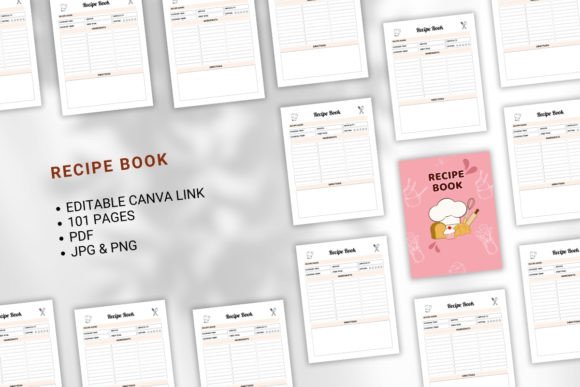
- 101 fully designed, printable pages (8.5 × 11 inches), sized precisely for KDP’s standard trim without bleed—so your margins stay safe and your text stays legible;
- CMYK color mode and 300 PPI resolution, ensuring rich, accurate color reproduction for ingredient photos, icons, and headers—no more washed-out herbs or muddy chocolate tones;
- Multiple file formats included: high-resolution JPG and PNG files for cover previews or social teasers, plus press-ready PDFs optimized for KDP upload;
- A live, editable Canva link—giving you full design freedom to adjust fonts, swap images, reorder sections, or add your branding in minutes—not days.
Unlike static PDFs or locked templates, this Editable Recipe Book Canva Template KDP Interior puts *you* in charge. Want to highlight your grandmother’s handwritten notes? Add a “Chef’s Tip” sidebar? Insert a custom index or weekly planner? You can—without coding, plugins, or hiring a designer.
Practical Ways to Use Your Recipe Book Canva KDP Interior
Here’s how different users apply it successfully—and what outcomes they achieve:
Home Cooks & Food Bloggers
Convert years of blog posts into a cohesive, ad-free cookbook. Use the editable Canva link to import your own food photos directly into designated image placeholders, update ingredient lists with consistent formatting, and add short origin stories beside each dish. Result: a heartfelt, visually unified book that feels personal—not generic.
Meal-Prep Coaches & Nutritionists
Leverage the clean, modular layout to build themed chapters (“High-Protein Breakfasts,” “30-Minute Dinners,” “Gluten-Free Bakes”). Customize section dividers with your logo and adjust font weights to emphasize macros or prep times. The included PDF files let you quickly generate client handouts or email opt-ins—while the same Canva file becomes your KDP-ready interior.
New KDP Authors Testing the Waters
If this is your first book, the Recipe Book Canva KDP removes guesswork. No need to learn KDP’s interior specs from scratch—the template is already tested and approved. Just replace sample text, drop in your recipes, export the final PDF, and upload. Many first-time authors go from concept to live listing in under 48 hours.
Key Considerations Before You Begin Editing
To get the most from your Editable Recipe Book Canva Template KDP Interior, keep these practical tips in mind:
- Always make a copy first. As noted in the instructions: go to your Canva homepage, open the shared link, and click “Make a copy.” This preserves the original link for future use and ensures your edits won’t affect anyone else’s version.
- Use Canva’s “Brand Kit” feature to save your primary font pair and color palette—so every page stays on-brand, even as you edit across dozens of recipes.
- Test print a few pages at home before finalizing your KDP PDF. Check for hyphenation breaks, image sharpness, and heading hierarchy—small tweaks here prevent reader confusion later.
- Double-check KDP’s latest guidelines. While this interior is KDP-tested, Amazon occasionally updates file requirements (e.g., metadata fields or cover spine calculations). Always verify against their current help center before uploading.
What’s Included—And Why It Matters
Your purchase includes more than just files—it includes confidence:
- “Belongs To” page—a customizable title spread that welcomes readers and reinforces ownership (ideal for gifting or branded cookbooks);
- Consistent typography system—with distinct styles for recipe titles, ingredients, instructions, and notes—so readers scan effortlessly;
- Print-optimized spacing—generous line height and paragraph breaks that reduce eye strain during cooking;
- No hidden layers or complex grouping—every element is easy to select, move, or delete in Canva, even for beginners.
This isn’t about flashy graphics—it’s about clarity, usability, and trust. When your readers can find the garlic quantity in two seconds or locate the oven temperature without scrolling, they’ll return to your book again and again.
Final Thought: Your Recipes Deserve to Be Seen—and Shared
A great recipe only becomes timeless when it’s easy to use, beautiful to hold, and simple to publish. The Recipe Book Canva KDP bridges the gap between inspiration and execution—giving you the tools to share your culinary knowledge with authority and ease. Whether you’re building a passive income stream, growing an audience, or simply preserving traditions for your family, this interior helps you do it well.
If you appreciate thoughtful, creator-first resources like this Editable Recipe Book Canva Template KDP Interior, consider following the creator’s profile for new templates—including seasonal editions, kid-friendly layouts, and multilingual versions. Because great food deserves great presentation—and every cook deserves a straightforward path to publishing success.